Wednesday, 7 October 2026

Omarchy - the new darling of the Linux world

 Omarchy is the buzzword at the moment, with it turning up on Network Chuck's YouTube channel. I came across it via DHH's blog post here: https://world.hey.com/dhh/omarchy-is-out-4666dd31 and thought it was pretty neat. I'm usually a Linux Mint kind of dude, but I'm open to change and trying new things so I briefly looked at it back in '25 to see what was happening there. The colours and the set up were very different from the darker greys and greens of Mint, but I stuck at it for a bit, trying to get used to the different way of managing things. It didn't stick and I reinstalled Linux Mint and went on with my life.

Recently I watched the Network Chuck videos on Omarchy and decided to give it a try again. You can watch them here: https://www.youtube.com/watch?v=9SDkU5VDQEQ I have an X1 Carbon - 6th Gen with an 8th Gen i5, 8GB of RAM and a nice quick SSD. It's got the nice, higher resolution screen, good battery and the keyboard you know I love.

Omarchy took 2 minutes to install completely on the X1. Ready to go. It tried (in vain) to configure my fingerprint reader - which Linux still hates, had WiFi, Bluetooth and everything else ready to go on boot and is snappy. Once I started to figure out the SUPER KEY + to get to menus, maximise windows, close stuff and so on, I found myself starting to enjoy Omarchy. There's tonnes of great configuration options easily accessible including plugins which are used to deliver all kinds of useful tools. For example, the plugin that controls multiple monitors was installed quickly and gave me easy access to manage monitors, arrangement of them and also the resolution. Handy when I had to deliver a presentation the day after installing it on a TV. Everything just worked and this is a bar that I hold dear to my heart. 

Printers worked perfectly and Omarchy found both of mine on the network without delay, printing in colour and double sided without any issue. The themes are comprehensively built and look lovely - the base, out of the box ones are great. Changing between the themes is easy too, and I really like that you can do SUPER + space and get to a menu without taking my hands off the keyboard. 

Omarchy is built on Arch Linux, which has a reputation of being a bit of a challenge to manage - it really needs a Linux nerd driving it to make it sing and dance. What Omarchy does really well is to take that complexity - which really covers a very capable system indeed - and turns it into an easy to use and powerful system. Updates are straightforward and the system manages it beautifully. I just updated it and it asked me to reboot. On a "No", it restarted the plugins and waits patiently for the reboot. Easy! Installing Brave was simple too - SUPER + Space -> Install -> Package -> Brave and boom, it's done. Brave works as advertised and as usual so happy days. Damn this is great! I'm getting impressive battery life from this distro too.

To help put things in perspective, this computer could run Windows 11, but not well. That pig of an OS uses up resources like RAM is free, and is a bloated bastard to run. Omarchy (and Mint) make this old laptop crack along and its still a great machine that has plenty of years left in it. Omarchy has breathed new life into this great little machine. It's an easy install and I can recommend you having a crack at it. Pick an old machine - hell, go to eBay and get a nice little X1 like this (I'm writing this blog post on this machine) and have a crack at Omarchy (or Mint, or any Linux install) and see how you go. It's a great bit of fun, and you never know - you might convert to a wide new world of Linux!

Thursday, 27 August 2026

AppleTV and Jellyfin

 I like the AppleTV - what a great little bit of kit. The sad thing is, the application that connects to my Jellyfin server has been very hit and miss. I've tried a few different things and it has not been a great outcome at times. 

Swiftfin was OK but had issues with some file types and then stopped working entirely. I'm not sure what happened with it, so I got frustrated and ditched it.

JellyTV was initially promising and the carousel look was pretty neat, but the connection to my server was consistently crap and fell over a lot. It would stop playing videos, lag, and have all kinds of problems. No network issues or anything like that so again, I got frustrated and got rid of it.

Infuse looked amazing, but as soon as I tried to play anything it wanted to upgrade to Pro and that was that. Off with it. Open Source for the win!

Ah look! A new version of Swiftfin has arrived. I installed it - it looks different, and the functionality has improved. OK that's exciting - initial testing is going very well.

At the back end of all of this I added an Nvidia graphics adaptor to my server to try and improve Jellyfin's capabilities and it has certainly helped, especially with the higher end formats of videos (8K for example). I thought this would help the AppleTV deliver vision to my eye balls better, but it did not. It appears the app you use is a big chunk of the problem and so getting the right one is key. My continued testing has shown Swiftfin to work pretty well. It's supposed to be a native app so my expectations are it will work fairly well. 

I have read that the Jellyfin leads have finished up or walked off? I'm not sure, but I want to thank everyone who has worked on the project - it's pretty amazing and works really well. You all have done a great job and end users like me are very grateful. 

Sunday, 23 August 2026

Humbled playing Elden Ring

 I've been a computer gamer for a long time - and I mean like, a really long time. Think Double Dragon on an old Amstrad around the late 1980's old.

To wind down and relax I've picked up a few different games, and being older and behind the time I'll often grab a game that's a couple of years old, cheap on the Microsoft Store or Steam and then launch into it. My little fella encouraged me to try Subnautica - saying it looked pretty cool. 

And it is! I dived into the game (see what I did there? :-) ) and got into it, dying very frequently and enjoying some of the jump scares as the aquatic life decided I was a tasty morsel and good for a bite. Lots of fun indeed. I finished it, ran through it again with a lot more panache and far fewer deaths and got into the second iteration - Subnautica Sub Zero which adds some entertaining cold environment and ice related elements to it. While not as long as the first one, it was very enjoyable and the new equipment and habitats fun to mess around with.

Subnautica 2 has come out in a pre-release version and I've gotten as far as I can in that too. My advice is simple when playing these games - pay attention and search everything! Also, watch out for the big fish!

I quite like the Dungeons & Dragons style of games and have spent many, many hours in Skyrim, Oblivion and Baldurs Gate (1, 2 and 3), so I decided to try out another in development game Enshrouded. Quite fun indeed and nearing the 1.0 release so it's quite polished. I've risen in levels and found that the inevitable grind has impacted my enjoyment somewhat. My nephew suggested Elden Ring, citing it was the best game he's played, he's finished it and it is a challenge.

A challenge you say! Well let's get to it.

Yes it indeed is a challenge and I had my butt whipped on a very constant basis. One cannot simply swing a sword with abandon in Elden Ring - you get killed, and you get killed frequently. The very first major dude kicks your arse and that's when I thought it might be worth checking out a bit of Youtube or other media to learn about this game before I rage quit forever. It turns out that the designers really don't want you to just bash your way through, and you need to take your time. I have not yet passed through much of the game - I am still learning all the ways that this game subtly differs from the aforementioned fun I've had in the more survival, base building type games. Elden Ring is not that kind of game. 

It's refreshing to come up against a game I can't just blast through, but equally frustrating because a lot of the tried and true techniques I've used in the past are not applicable. I'm also battling with the keyboard and mouse - my normal modus operandi, as I'm playing on my Legion gaming laptop. Sadly, I think this might be easier with a game pad of some type. As I've bought it through Steam, I'm not that keen to re-buy it on PS5 which is a bummer. 

So far, it's been very swearingly frustrating, yet equally entertaining. Stay tuned as I attempt to get myself through a play session without dying (it hasn't happened yet). 

Tuesday, 9 June 2026

Webtop - an impressive remote access tool

 I've been looking for a while for something that allows me to remotely access my home systems. I can't use a VPN, or RDS to connect back to my systems, so it had to be something useful via a web interface. Finding an option that allows for a Remote Desktop in a web interface isn't easy. I tried a few different options and had very little success, which was annoying and required quite some time to get things to work. Until I stumbled on webtop! You can find it here: https://docs.linuxserver.io/images/docker-webtop/ and it's worth having a look at.

I'm running it in docker, and I used this https://github.com/linuxserver/docker-webtop to set it up. The process is relatively straightforward and I'm running it in a Linux container. I've found with my server that 4vCPUs, 6GB of RAM and a 30GB disk have proven adequate for my daily computing needs via the webtop system.

It's an immutable file system, so any changes you make will be rolled back on restarting it. Instead, to add more software, you must use the Proot method - this makes the software stick. My needs are relatively simple, so I've installed Obsidian and a different browser. It wall works very acceptably, is fairly quick and usable. I also use the built in Office system LibreOffice for spreadsheets and files. The Documents/Downloads etc folders are not immutable and these retain your changes which is handy. I've had it manage some very sizeable spreadsheet files and it was fine to use. 

One of the great things about using Webtop is having a foothold outside of the office, so if I'm doing pen testing, or vulnerability scanning I can do it from outside the production network and see what I can find. It also allows me to access different websites than what I can see in the office. For example, if we have a class of websites blocked, like AI ones, but I'd like to read about Claude Mythos I can't at work, no matter how important it is for actual work. So I can use webtop to do that research without waiting until I get home. 

It's handy also, because you can drag stuff to the webtop page and upload it into your desktop or file system. As an exfiltration system it could be very good, so I made sure our DLP was up to the challenge - and it proved an interesting test system to verify that the DLP rules were working and firing when they were supposed to. 

I haven't go screenshots for you to see - instead go and check out the developer's site and spin it up in a docker container. It won't take long and the outcome is a great tool for work and play. 

Sunday, 31 May 2026

TheHive - an excellent case management tool for Digital Forensics!

 In my work in cybersecurity, I've been quietly using TheHive made by Strange Bee https://strangebee.com/thehive/ for the last few years. Initially I was searching for something to analyse forensic data and stumbled on this project. It's got both an Open Source and a paid version, and I've had great value from the community version. Paired with Cortex, TheHive is a powerful tool for the cybersecurity professional. Cortex is the system that does the analysis of your artefacts and then reports back into TheHive. This isn't the only integration that TheHive supports. You can push new cases into it from both MISP and from Wazuh, and then run triage and analysis from within TheHive. It will push details back into MISP so when you review an alert or report, then you can classify it in TheHive once, and it will update it back into MISP which is pretty neat.

Here is what a couple of entries on the Dashboard looks like:


The dialogue box to create a case is below 


And this is what the case page looks like:


Typically, I'll do the following:

  • Create a case, choosing the appropriate level of severity
  • Add at least one task to the case - usually "Review Observables" which is TheHive talk for artefacts associated with the case - and these can be all different types
  • Add the observables - of which there can be many types as seen in this screenshot: 

    and with the "Type" sorted out:

    Here is where TheHive and Cortex shine together. The observable type is linked to analytics that Cortex runs for you - you'll have to set it up, but the good news is, it's quite straightforward and can all run on a single server. Cortex will run the analysis of your observable and then report back. For example, you might configure Cortex to query Google DNS for bad websites, VirusTotal for known bad artefacts, AbuseFinder is handy, and so is Urlscan.io. Here is an example of what a couple of bad IP addresses look like after Cortex has analysed them:
    Red is bad, Orange is suspected bad and green is... well Cortex either isn't sure or the results are inconclusive. 
Cortex requires some grunt to run, so when you read that TheHive + Cortex needs 16GB of RAM and at least 8 CPUs you can understand why - with many concurrent analytics being performed against the observables, and doing it in a timely manner. I run it on my Proxmox server and it gets along quite adequately. 

When you're working through the case, I use the Tasks to capture what I'm seeing, and use the "Comments" to report on my findings. These can be timestamped (which you should always do) and if you happen across an observable or a similarity to another case, TheHive will automatically link it through. Then you can begin the next phase of action, whatever that may be, and track the case to its finale. In the example above, we saw significant attacks on our Web Application Firewall and blocked the addresses, fixing the problem from a known bad (at the time) IP address. It may have been fixed since, and that's why it is important to re-analyse observables. Hijacked sites/IPs or similar can be recovered and I always want to give my fellow cyber security and IT pros the chance to fix their systems without needlessly blocking anyone. 

TheHive has nice reporting (I don't have an example that doesn't have sensitive data in it), and I've found as a system for managing what I am seeing and being asked to respond to, it has been excellent. I use the Community edition - I don't get a lot of cases through work, but I do get a few when I'm helping out people outside of the office and TheHive is great for supporting that community work. I've had several interactions with their team and they've been generally very good, so thank you StrangeBee members!

I've meant to write about TheHive for a while - it's a great tool, and I think that if you've got a forensic element to your work it can really add value to that work. 

Wednesday, 26 November 2025

Taking notes with Bookstack

 I've been looking to use a different note taking tool than Confluence - only because I want to have my stuff self-hosted, so I've been poking around at a few different options. I've played with rwMarkable, Trillium, Notion and others. Suffice to say, I've been down a rabbit hole on this... and I've ended up on Bookstack.

You can find the website here: https://www.bookstackapp.com/  Self-hosted is very attractive to me at the moment. I really don't have a lot of love for having my data out there with anyone else - especially US based companies. There's a bit of uncertainty out there with the behaviour of the US government, so I'd prefer to repatriate my data where possible.

So I needed somewhere I could punch a heap of written data, with some features, a nice editor and not too hard to manage. Happily, I discovered Bookstack.

Under Proxmox, I set up an LXC (Linux Container) and then using a script from https://community-scripts.github.io/ProxmoxVE/scripts?id=bookstack I installed my instance fairly simply! It's running with 1 vCPU, 1GB of RAM and 4GB of disk space - it's hardly the biggest VM I'm running (ah the beauty of the LXC in all it's glory!). Even with these modest specifications, I've found it to run very efficiently, easily uploading images and managing some quite sizeable documents.

Here's a screenshot of what my page looks like:


I have two "Shelves" and each Shelf has multiple books in it. I won't show them - there's secret stuff in there :-)

While it's hosted on my Proxmox server internally, I've used Cloudflare tunnels to provide me with a nice Zero Trust way to access my own systems from anywhere. MFA + Conditional Access all courtesy of the Cloudflare's free tier. Additionally, and I can't shout this out enough - I used Cloudflare for all my DNS which means that managing tunnels and published applications is that much easier. It's a lovely way to do things and I'm praying that we don't get a bunch of enshittification take place. For the moment, it's a wonderful way to do things.

But onto Bookstack - it's a nice WYSIWYG interface. I'm using the dark theme and it looks like this: 


Now, here's a tip - up until about 2 hours ago, it didn't quite look like this. Make sure in the .env file that you have the correct URL or things won't work properly - drafts won't save, the scroll bar won't work, and the text on the dark page will be black not white. Easily fixed by up sorting out the .env file and then running the php update command. 

Bookstack is a nice, lightweight application and works very well. Combined with the easy Proxmox backups, I have found it to be an excellent system for keeping my documentation together. Try it out!

Wednesday, 24 September 2025

Experiences with Jellyfin

 I've been running Jellyfin for a while now - I tried Plex but it didn't gel for me. Jellyfin was pretty straightforward and just seemed to work really easily. So here's their website: https://jellyfin.org/ 

There are a few different ways to run Jellyfin - install it on a system running on bare metal, or a virtual machine, or even in a container (either a Proxmox LXC or a docker container). I messed around with it a bit, and decided to take a straightforward route - install it onto a virtual Ubuntu Server running on one of my Proxmox servers. 

The set up was pretty straightforward - there's some good details here: https://jellyfin.org/downloads/server and it was easy to set up the repositories and get the thing going. The initial configuration is fairly simple, and for me it required a few components:

  • a server to run Jellyfin
  • a link of some type to where all my media (TV and Movies) live
I have a NAS with plenty of disk space so I set up an NFS link and hooked the two servers up together. This was pretty easy, and for this install, I gave Jellyfin read/write access to the different directories - so if Jellyfin was downloading images or metadata I had a chance to keep it all neat and tidy together. The security is simple, but reasonably OK - it won't keep anyone determined out, but it's not critical data.

So after the initial install and set up of Jellyfin - there are some great guides out there so it's worth finding one and getting into it - I added the TV and Movie folders to Jellyfin and kicked off the initial scan. There's a fair bit in those folders - I've spent a small fortune on DVDs and digital media over the last few years, so this took a while to complete. Then there was the work to go through and make sure that the Movies were properly identied. Gran Turino never seems to be detected properly - but it's reasonably straightforward to fix it up. The data flows between servers got fairly intense for a while but eventually settled down.

There are some tuning options in Jellyfin - go to the three lines in the top left, and then Dashboard:
Plenty of things to touch and play with in there :-) It's worth reading through some of the documentation to make sure you pick the best options. I typically will enable a few extra plugins:


These are to get the box sets of TV series right, and the images / identifiers correct for files. Choose your own adventure. 

I had been watching Jellyfin via iPad or via a web browser, and it wasn't until I was poking around a bit that I found an app for the Apple TV - Swiftfin! This was a game changer in our house - we had used a media PC for all our TV and movie watching and now we could just use the Apple TV which is great! 

With a relatively slow internet connection (25/5Mbps) I had been downloading only low res stuff - otherwise it took forever to get and wasn't great for fast movie viewing. This was fine - I was running Jellyfin on a server with Xeon 4114 Silver processors - which are great for compute and server stuff and absolutely crap for video decoding. As the Australian NBN network was upgraded and I managed to get a fiber upgrade to 100/20 speeds and then, almost unbelievably a free upgrade to 500/50 meant all of a sudden those high res, much nicer looking downloads were in my reach! So excitement!

But with great speeds (and resolutions) come great encoding and decoding requirements. Dual Xeon processors don't cut it (especially when they are server CPUs) so I have a little problem - the load on the CPUs is huge and it takes a long time to sort out the video to deliver it. To fix this, I lashed out and picked up an Nvidia Tesla P4 server GPU - and wow what an impact this has made. The load on the CPUs has dropped to a negligible level and the responsiveness of the video playback is excellent - virtually real time which is fantastic!

Settings look like this (so I have a record if Jellyfin dies):


It's really worth the $130AUD that I spent on it - gotta love second hand gear off eBay! Really worth it. 

I've had very little trouble with Jellyfin - it's been a solid bit of software to work with. If you combine with the *ARR servers, then it becomes a thing of great beauty - but more on that later!

Wednesday, 3 September 2025

Review: Lenovo Legion 5i Gaming Laptop

 I picked up a Legion 5i at Officeworks on special before the end of the financial year here in Australia, and now that I've messed around with it for three months, I wanted to write something nice. Yes, nice - it's been a really lovely laptop to use. First of all it looks like this:


And my model has the following specs:

  • 13th Gen Intel Core i7-13650HX (2.60GHz) - 14 cores!
  • 16GB of RAM
  • 500GB SSD
  • NVidia GeForce RTX 4050 GPU
It cost me about $1300 AUD - it was marked down from $1800 and then had a further 5% reduction because it had been returned - the purchaser quote "didn't like the operating system", because there are a lot of preinstalled options to Windows 11 these days. At any rate, I picked it up for a song - potentially because it's a previous model - but who cares? It's got a 16" screen that supports 2560x1600 and it's really lovely to behold. The backlit keyboard with it's cascading light show is a nice touch too. 

From a use case perspective, I've been using this laptop for gaming, regular work stuff, a bit of Ollama AI work and movies. I've played Baldur's Gate 3 and Fortnite on it most extensively and mostly used the Mistral model when using local AI. The games have been snappy and great, with lots of effects on and no real slowness which has been nice, and the AI has worked fairly quickly. The limitations of what you can do on an RTX4050 with 6GB of RAM are well known. It's nice to have a machine that can actually drive the thing though and I've had some real fun. It's important to note that like most Lenovo laptops, the keyboard is great to use for extended typing - and with extra little bumps on important keys (not just your home keys, but also the home keys for gaming) it's been pleasant to use - far more so than the Dell I use for work, which has an overly soft key press and much poorer tactile response. 

The newer versions have i9 processors and a better GPU but appear to have much the same form and appearance. I'm very happy with it - the Windows 11 install doesn't have too much bloat so that's a good thing, and the Lenovo update system works pretty well as usual. Altogether I can recommend this laptop - it you want a nice mid-range gaming machine, or a big solid work laptop that can give you pretty much a desktop replacement with it's big monitor. Although I purchased it as a tax deduction and I've used it for a *lot* of work related activities (particularly stuffing around with locally hosted AI), I've been pleased with it's gaming capabilities too - perfect for the lad and I to get into a bit of FPS action. 

Thursday, 10 July 2025

Further adventures with Immich - external access

 Astute readers and users of this software will note that when self-hosting access is naturally limited to whatever you've got on your personal, home network. While this is great, I'd like to still back my photos up to Immich when I'm out and about.

I use Cloudflare tunnels for access to other handy bits of software like The Hive (for digital forensics) and BookShelf (for documents etc). So setting up a Cloudflare tunnel for Immich seems like an easy thing to do. Except of course when it comes to authentication. You do not want to implement a tunnel without authentication and I really prefer to use Zero Trust wherever possible. I am a child of the X-Files after all, so trusting no-one is par for the course.

I found an excellent guide to help by Thomas Wilde on Youtube here: https://www.youtube.com/watch?v=J4vVYFVWu5Q and this really got the party started. Configuring the service token and getting it into the Immich app is quite straightforward and Thomas explains it well.

I then changed the app to sync as soon as the phone is plugged into power and voila! It all works brilliantly. 

OK, so we've solved the external access trickiness, and that's great. Keeping up with the updates is a bit of a challenge - Immich is being *very* actively developed so there's frequent updates. I usually try to update the docker image about once a fortnight and that seems to be manageable cadence.

It's worked so well that I have now moved my wife and daughter's images across. My child takes many many photos so I'm working with her to understand that the crap ones really need to be deleted - I don't want gigabytes of crap everywhere.

And of course, I snapshot the server before upgrading via Proxmox and backup using my Proxmox backup server. A restore of my Immich server was quite successful after a poorly executed attempt to change some settings for another project - oops! Thankfully, it was quick and relatively straightforward to get back to where I was, with only 18 hours and no data lost.

I still recommend this excellent app - you will need to learn some docker and some general systems admin skills. I would not recommend opening it up to the world - and why would you when you can make use of Cloudflare tunnels, or failing that - Twingate which I discovered and have been playing a bit with - more on that later. Enjoy your computing!

Thursday, 7 November 2024

Adventures with Immich

With the implementation of my Proxmox server it's now time to play with some new applications - and we'll start with Immich, a replacement for Google Photos. What is Immich according to their website: 


You can find the delightfully comprehensive website at https://immich.app/ 

Now a quick note of care - Immich's website states that you should not use this as the only way to store your photos and videos - it's under *active* development and does occasionally break stuff. So with that in mind, let's get into it and have a play.

To implement Immich in my environment I definitely had some options to explore. I could install it using Docker, the All-In-One Community installation, TrueNAS (oh I don't have that yet) or Unraid (dang I don't have that either). I decided to go with the Portainer installation - that would give me a nice interface via the Portainer container management, and some stats and stuff later on. Installing Portainer means that I can't use a Proxmox container - it's not recommended, and I was keen to not screw this up. So here's the quick and nasty installation activity:

Before I set up Immich I noticed that my install of Ubuntu Server hadn't used the entirety of the 500GB disk. So I found this handy command to fix it:

lvextend -l +100%FREE -r /dev/mapper/ubuntu--vg-ubuntu--lv

Right, now we'll get onto the installation of Immich and get into it here: https://immich.app/docs/install/portainer 

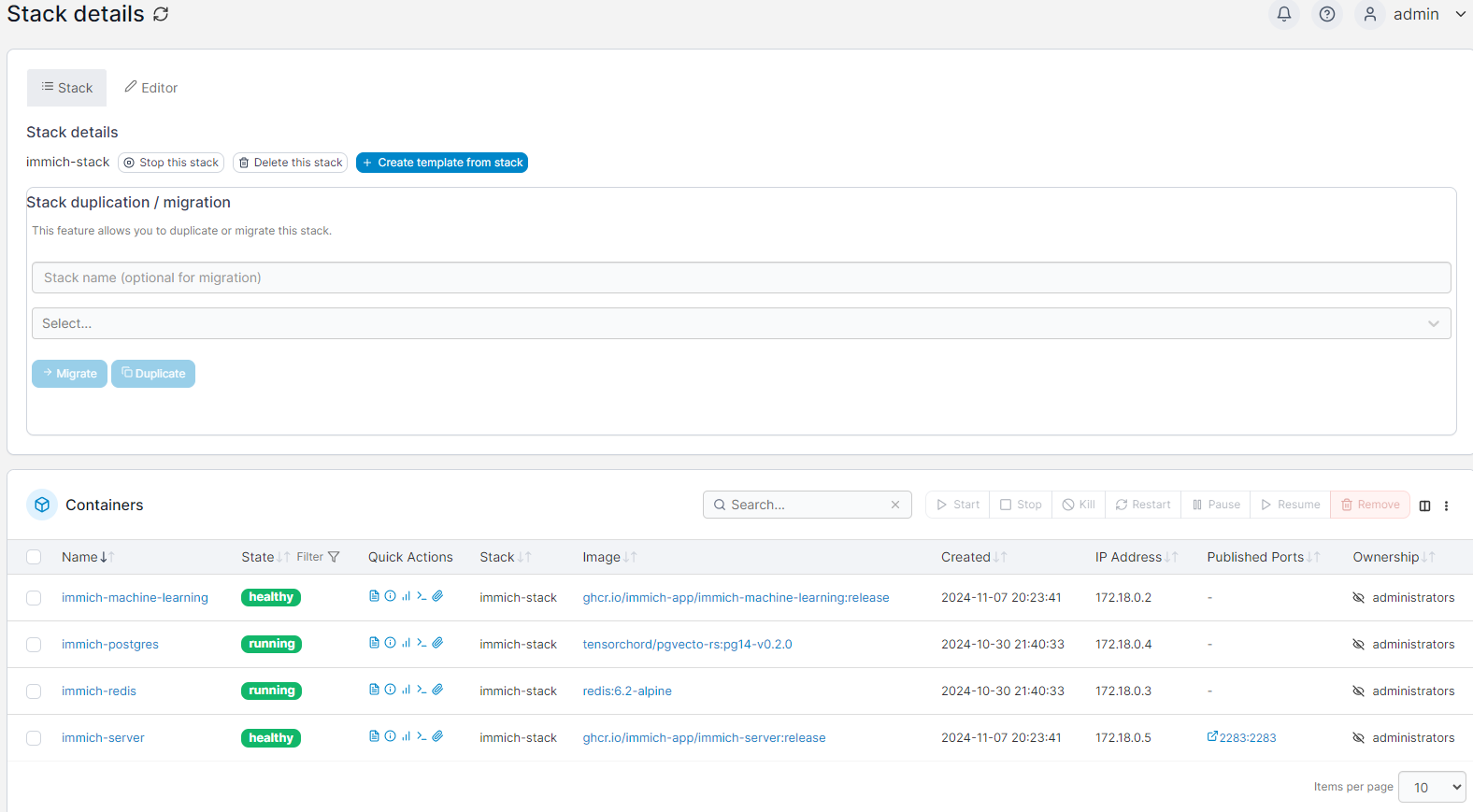
The long and short is, set up a Stack so that all the Immich bits and pieces sit under it and then off we go. The guide is quite good so follow it and there are plenty of resources. The stack ends up looking like this: 


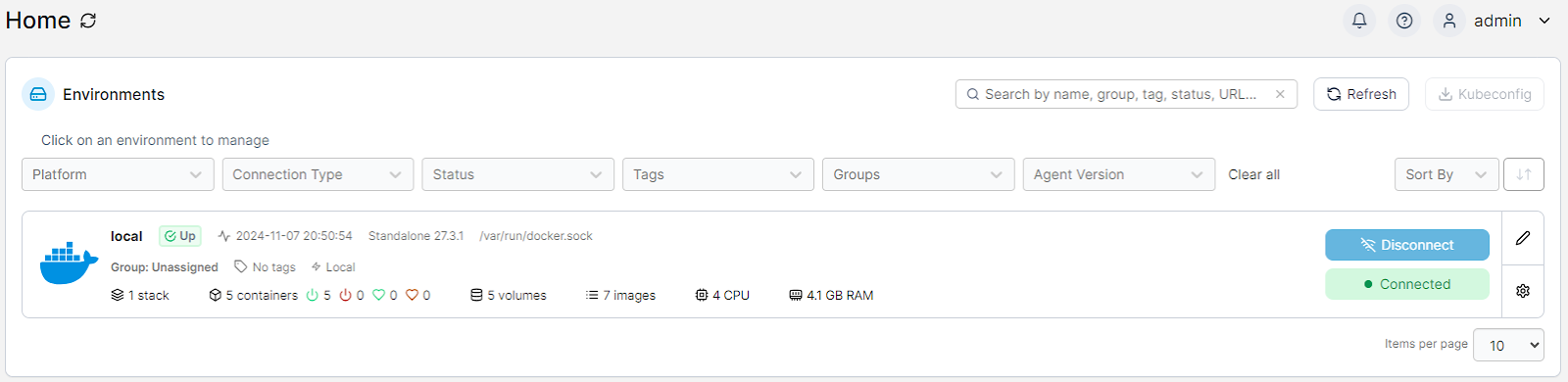
From the Portainer home page it looks like this:


Happily it's all running. Now here's the thing - this is the third time I've tried to get Immich to work and previously it was busted and wouldn't work properly - no access to the website and it appeared that the immich-server component wouldn't launch properly. I think that there was an issue with the database server not running properly with a previous version of the docker image. This time around, it all worked as advertised and it's running better. 

So now we're onto the use of the system and here's where I got really impressed. On the initial upload of photos it started to pick out faces, locations and organise things neatly according to the age of the photo. It here I discovered some of the photos had a wildly inaccurate timeframe assigned to them. Bugger - this means I've gotta manually fix things up, but it was pulling the images in, working through the metadata and putting it together into a nice timeline.

Here's the impressive part, there's a mix of photos of my kids that I uploaded started with my child almost at birth and all the way through to 13 - and the machine intelligence detected her face correctly the whole way through to now! From a cute little squishy baby face to the perpetually annoyed teenage face Immich got it right nearly every time on the full frontal face images. Really impressive stuff.

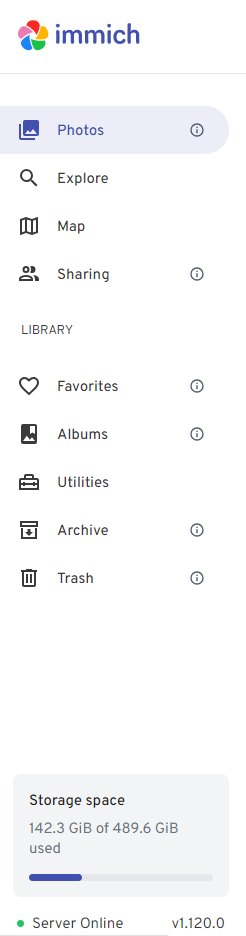
Here's a little snip of what my system looks like (hiding most of the evidence): 


The menu is nice, easy to manage and gives you all the stats. I'm still building this system out, but here's a few things I've found:
  • uploading photos to the system was easy - via the file upload, and you can do bulk but not folders
  • uploading photos is VERY CPU intensive - I had the 4vCPU's maxed out during the upload and for a while afterwards as the system processed - it was cracking along and the server's fans were making a real racket.
  • it's much better to do the upload via ethernet than Wi-Fi - it's quicker (on my network anyway)
Once I finished the upload from our computers and other servers in the house, I installed the app on my phone (the Pixel 7 Pro) and started the upload. There was a difference in the experience - the upload from the computer detected and skipped duplicates while the phone upload did not and I had to do this manually (over 600 dang it). Happily now, I've got a backup of my phone (although it's definitely still not recommended to only have the two copies - remember 3 is 2 and 2 is 1 and 1 is none from a backup perspective. 

After a couple of days playing with Immich, and running an upgrade via Portainer, I'm delighted with it. What a great piece of open source software. Get around it if you're looking for a nice image management system. 

Sunday, 29 September 2024

Playing with Proxmox

 Up until recently I've used Hyper-V for most of my virtualisation needs. Hyper-V is a fully integrated Type 1 hypervisor and comes with most "Pro" versions of Windows 10 and Windows 11, and of course Windows Server. There's plenty of nice stuff with Hyper-V, don't get me wrong - I do like it and retain it. The trouble is - you need Windows for it, and if you don't have a copy of Windows Server, well - that's a bit of a problem. Enter then - PROXMOX! (That's supposed to be dramatic). 

Proxmox Virtual Environment - or Proxmox VE to be precise. Details are here: https://www.proxmox.com/en/proxmox-virtual-environment/overview but the summary is this:

Proxmox Virtual Environment is a complete, open-source server management platform for enterprise virtualization. It tightly integrates the KVM hypervisor and Linux Containers (LXC), software-defined storage and networking functionality, on a single platform. With the integrated web-based user interface you can manage VMs and containers, high availability for clusters, or the integrated disaster recovery tools with ease.

 I can hear you now - that's freaking amazing, but so what? Well, a Type 1 hypervisor with a full feature set is very nice to have - management of all your resources is very good, and you get access to ZFS for managing disk - oh and Ceph is built in! If you don't know what Ceph is, then Network Chuck has a great video on it here: https://youtu.be/jJrnJ9rj6fs?si=3KOunfnbodFLnFlw 

I haven't had time to play with ceph much yet, but I look forward to doing so shortly. Back to proxmox. I recently acquire a HPE ML30 server. The specs are reasonably modest:

  • 8 x Intel(R) Xeon(R) CPU E3-1240 v6 @ 3.70GHz (1 Socket)
  • 24 GB of RAM (now 32)
  • 3 x 960GB SSDs on a SAS RAID array.
  • along with all the normal HPE server stuff - a neat and tidy lay out, with extra SATA and plenty of power for extra disks.
In the Proxmox console it looks like this:


The ML30 came with Windows Server 2016 - and this isn't ideal. Installing Proxmox was a bit of challenge though - the 3 SSDs were in RAID5, and Proxmox did not recognise or acknowledge this array. So adios array - I deleted it and set up a ZFS array. I also put a 10TB HDD in from an external drive I had floating around. The end array looks like this:


Now here's something that is a bit cooler than good old Hyper-V - you can run virtual machines and containers:


I haven't messed much with containers - but now I have, I am really impressed. And here's why - this server hasn't got a huge amount of RAM, so when I run a virtualised server I have to make sure I'm not running out of memory. Using containers means that the virtual machine shares elements of the hypervisor, which reduces the amount of RAM (and CPU) that one needs to expend on a virtual machine. Happily, this means that even with a fairly modest 32GB of RAM, I can run the following servers in containers:
  • Linux server for secure connections to other servers
  • Linux server to manage my Cloudflare tunnels (more on this later - so awesome!)
  • Linux server running Jellyfin - this is the heaviest container I've got and runs really well with 4 vCPUs and 4GB of RAM.
  • Linux server running NextCloud and helpfully set up using an LXC script. This was a very easy way to set up a Debian server, and all the necessary bits and pieces. I'm playing with NextCloud a bit - I'll write up some stuff down the track on it once I've worked with it a bit.
  • Linux server running torrent management for the legitimate torrents I download (like Mint and Ubuntu Server).
  • and finally, a Wazuh SIEM server running as a full VM. This is the big momma of all my VMs with 8GB of RAM and 4 vCPUs. This thing pushes the server load up when it boots quite significantly. 
This runs on the server at about 50% of the available RAM. CPU is up and down but rarely sits above 20% even when I've got a couple of movies or TV shows being streamed. 


In this image you can see I've got a container as a template. I set up an Ubuntu server, set password, SSH config and a couple of other things. I patched it up, and then shut it down for later on. I've used it to create all the container VMs, except the Cloudflared and NextCloud VMs - you can search up a script that you run and it downloads/configures the server. This was excellent as a quick way to get started - especially after I screwed up the first implementation and had to start all over. Oops.

So the final word is this - the problem I had with choosing a hypervisor with plenty of features has been solved with Proxmox. I've got a few other bits to work up now - messing with ceph, installing the Proxmox backup system from here: https://www.proxmox.com/en/proxmox-backup-server/overview and pushing this server to its limit. It needs more disk, and I've given up on trying to find RAM for it - bastard of a thing must have the most rare memory type ever. At any rate, it's a solid server, and now it's running reasonably well I'm quite happy with it. If you're looking to try something new out, I can recommend giving proxmox the once over. Some of the home lab projets on YouTube are wild - guys running NAS servers using passthrough for disk, other guys running AI systems with video card passthrough and all kinds of other stuff. 


Sunday, 25 February 2024

GT7 - Super Formula challenge

 Holy moly these freaking cars are something else to drive. Forget all your old brake points, drive lines change and acceleration and handling are next level. I have had many accidents, spins, crashes and just generally crap driving in the SF19 Super Formula / Toyota '19 it's been wild.

One does have to complete this series though, so I have put myself to the task. At Watkins Glen, racing on medium racing tyres and with the AI set to normal (not easy) I've finally managed to chalk up not only my first podium, but my first win as well! Yes indeed - with a 17:49.888 for the 12 lap race and the nearest rival at +18.749 I am pretty damn happy about that. It was by no means the first attempt, or the within the first 5 and my previous best was 6th place so I'm quite pleased.

Brake late, and brake hard, carry a heap of speed through the corners - easy acceleration and then pounce on it - flog it all the way through to the next braking zone and back the car to handle itself with maximum throttle and inputs. Woohoo! Great fun.

Now on to the remainder of this series - pedal to the metal and all that. Happy racing!

Saturday, 24 February 2024

GT7 Race Log - Weekly Challenges

 Ah the weekly challenges - lots of fun and great for topping up the credit balance! This week's had a single vehicle type race - the Tesla Model 3 Performance on the GT circuit at Nurburg, then Kei car racing and finally the 800 PP racecars at Watkins Glen in a 10 lap, tyre wearing, fuel burning race for the cash.

I took the ever reliable and wonderful Nissan GT-R NISMO GT500 '16 around Watkins Glen. There's a tune on Reddit to get it down to 799PP and this car is just so enjoyable to drive. The performance and long range are nice, but the handling, braking and speed are altogether excellent. By the 4th lap I was in front and dialled the fuel economy all the way down to 6, cruising home with a 40sec plus win and no pits. 

The Porsche Cup challenge race I took the Cayman GT4 Clubsport '16 for a spin and it's another really enjoyable car to drive. Not quite tearing the doors off performance, but very nice and in for an easy win in that race. I really like the handling and braking of this vehicle and I'll be doing more with it in the future.

Another element of the weekly challenge - the American Sunday Cup 600 at Michelin Raceway was fun too. I too the Corvette C7 Gr.3 Road Car out for it's maiden drive and I was pleasantly surprised. I do enjoy the growl of the big American engines and it's a good car to drive once you lock in the handling. Won handily and enjoyed the race to boot.

Next up I need to grind a bit - nearly finished all the Cafe extras but still have a few white whales to catch out there. Enjoy your racing!

Wednesday, 10 January 2024

GT7 - many races and lots of fun!

 Ah it's been a fruitful and fun few days. After slogging through racing the Red Bull cars, I needed extra cash to get the Super Formula car and get into that last Cafe ticket. On the way though, I've had a bit of fun with three cars in particular - the Porsche Cayman, the R34 Nissan and the BMW M3 - engine swapping all three. Holy moly that Cayman is a beast with 1199HP - it's drivable, but one needs to add a bunch a extra bits to make this weapon stop! So much fun.... thought I'd try it at Sardegna in the 15 lap race, but the fuel economy is terrible. 2 laps and it wants to refill - that's probably a bit crappy for that race :-)


The R34 Nissan and the BMW are heaps of fun to drive. Took them around the Le Mans 24 hour circuit in the 30 minute 700PP race. The R34 monstered everyone else - especially on RM tyres. I was also lucky enough to get a race on this track with only threatening rain. Stopped once for fuel and powered onwards. Loved it. The race in the BMW 03 was a different story. Same track, same race and it pissed down - swapped to IM tyres after the second lap and probably should have gone to heavy wets - it was really wet! It was probably the 6th lap before I managed to get under 5 minutes - and no-one else was quicker. Crazy wet. Love this car too - make sure you stick front, side and rear spoilers on it - otherwise it floats along a bit and doesn't bite into the corners very well with plenty of power understeer (eww!). Turn the fuel management down on both cars to get plenty of laps in, although this race usually has rain in the second or third laptop so change tyres and top up then. The race in the R34 was notable that there was no rain, so I smashed around the track in great time! Expect 7 laps on this race. Usually I take the Aston Martin Group 3 car with a little bit of detuning on this race. It's $550K to win and an interesting race to run. 


The final race I took on was the 15 lapper at Sardegna in the Porsche 917 "Living Legend". Had to slightly back the ECU off to get under the 800PP (back to 97 or 98%) and then off we went. Set the fuel management to 6 (so leanest possible), turned up the traction control a bit, and then short shifted a bunch - getting 8 laps out of this thing and doing the race on a single fuel stop. Didn't love this car all that much to drive, it was flighty in corners and the nose lifted up a bit here and there under too much power making it hard to really rip through corners. Ordinarily I take a tuned down Nissan GT500 (I think) on this track - the Group 2 one if you're looking. There's a great method to tune it down online somewhere - I'll have to dig it up and link to it. It's a ripper anyway. This is also the car I like to drive in the 60 minute race at Spa.

You can't do engine swaps until Level 50, but once you can it's a lot of fun. I'm aiming to do a few more cars over time. Enjoy! 

Tuesday, 26 December 2023

GT7: Neo-Classic Competition - Fuji International Speedway

 So I've saved up and got myself the Mercedes CLK-LM, a car I had as a model when I was a boy, although it may have been the CLK-GTR but very close. I've been working through the Neo-Classic competition. It took two tries at the Redbull Ring to get that one over the line - I totally blew the tyre choice as it looked like it was going to rain and then didn't - I had already pitted and came out on IM tyres which buggered me for the rest of the race. Attempt two and I pitted about lap 7 and then just drove the big ole' Merc home.


Here at Fuji Speedway, finishing lap 9 with a very quick XJR-9 in front of me and I thought I was stuffed for first place, but still, happy to finish second. I've got the difficulty turned up a bit and so I reckon any placing is pretty good. Bizarrely though, on that last lap, old mate in the XJR-9 decides to pit with one lap to go, so I sail through into P1 and hold it to the end? I had a bit of extra fuel, he had 14 and was on M race tyres so I don't know what happened there. I had thought I was stuffed - the previous lap I ripped straight up the Supra's backside at 300km/h because I wasn't paying attention and dropped from P1 to P2 with 2 laps left.


I'll take - I'm not saying I won't, but it was a weird way to get the win....

Friday, 15 December 2023

GT7: Le Mans 24 hour track - 30 min race

 I've managed to crack this one with the Aston Martin DB10 Gr3 race car with 95% of power. It's great - the car has long legs so I can comfortably punch out two or three laps. Usually rains around lap 2, or halfway through lap 3 so it's on to Intermediates - not Wets.


Have tried with other cars - no success. The AM is the winner for me on this track. 550,000 credits for a win, but let's try to play nice and get the Clean Race Bonus.

Working on the 800 series - need to pick the right car and bed it in for this. Still struggling a little getting the right vehicle, but it won't be long before I crack it. 

Friday, 8 December 2023

GT7 Race Log - Daytona Gr.1 Prototype Series

 This race continues to elude me from a success perspective. Still racing the Toyota (and it's a beast) and getting solid lap times - but not near the fastest cars. I think I need a fully managed transmission - I'm not hitting the top of 6th gear on the straights, and struggling to get over 300km/h because the gearing is wrong. I'm hitting corner apexes pretty well and the Toyota has the most remarkable braking - I'm picking up places under brakes a lot, it's acceleration while it has battery charge is great - but I'm topping out in 5th around 290km/h - and I still have a gear to go. So, still getting into the top 10, usually about 5th but can't crack the top three. Nailed Suzuka Circuit though - still pretty happy about that (especially during appalling weather). Nothing like that at Daytona though - just car setup needs work.


Hoping to get back to it today and also knock over the weekly challenges. 

Thursday, 7 December 2023

GT7 Race Log - Suzuka Circuit Gr.1 Prototype Series

 This one is taking a bit more effort - especially with some dodgy weather during the racing. The TS050 is a great car:


Image from: https://toyotagazooracing.com/wec/cars/2017/

I made a 20th (wow was that a crappy race), then a 17th and then a 12th. My final attempt of last night I scored a 6th and set the fastest lap time, but made a few mistakes early that left me too far from the top 3 to strike. Every run through gets better, and these machines are amazing to drive. I'll have another crack in the next day or so, and see if we can continue improving.

In the meantime, I've been watching the recent Manufacturer's Cup and the Nation's Cup on the Gran Turismo YouTube channel. Some amazing racing. Really felt for the Lambo team in the Manufacturer's Cup getting tagged and dropping back in the field. Those guys were smashing it. Enjoy your racing!

Tuesday, 5 December 2023

GT7 Race Log - Circuit de Sainte-Croix C GR.1 Prototype Series

 Hot damn! Ran this last night and came 16th with best time of 3:14 (RM tyres, single pitstop). Today I ran it, and that A. Wilk AI player knocked in a 3:06:XX as his hottest laptop and I managed a 3:07:XX. Came 2nd! I'm super happy with that. Running in the TS050 - Hybrid '16 and on soft tyres this time. At lap 6 dived in for fuel and new tyres - knocked me back a few places (I think I was 9th at the time) but I came out, flicked the fuel ratio to 1 and full power, then kicked it in the guts and got underway.


2nd is so much better than I hoped for. This run I was aiming for a top 10 at best, so I'm very pleased. I've struggled a bit at Daytona, but now I'm getting used to the handling of these Gr.1 cars - they're so different to the other classes, with really short braking zones, and absolutely heaps of power. 


Woohoo! More to come on this baby, yeah!

Saturday, 2 December 2023

GT7 Race Log - WTC700 Dragon Trail

So I haven't been messing with tech a lot lately, but I have been playing some Gran Turismo 7 and it's been a lot of fun. I need to record race information and thought others might benefit. My internet connectivity isn't great, so going up against other players has some difficulties associated with it. Playing the game though is all good.

This was a race I really enjoyed, even though I came third initially - probably because I screwed up the race tactics a bit.

The World Touring Car 700 races are great fun, and I'm still working out the car to take them on with. In this race, I took the very lovely Porsche 911 GT3 RS (992) '22 for a spin. It's unmodified and on RH tyres. Lap times were low 1:40:00's (I think the best was a 1:40:xx), but the fuel usage was my problem! I had to stop twice, even with the fuel mapping turned significantly down. It just didn't have the legs to get me through the race on a one stop strategy. The GR Supra Race Car beat me, and even with two stops I still placed third. I'll try it again in the Supra and see if I get a better outcome. Also of note, I just ran the WTC800 on this same track (different variant) and took the DBR9 GT around. It was a one stop race for me, in lap 8 with a squirt of juice to get over the line. I had taken one of my favourite cars - the GT by Citroen Race Car, but the fuel usage was an issue. I potentially could have driven better in this car, however, the Aston Martin seems to suit my style a bit better (FR vs MR) and I had better lap times.

OK so on with the run - this time the Supra Race Car on medium race tyres at Dragon Trail!

*** Update ***

OK that did the trick - the Supra was the winner with one fuel stop, and only a half fill to boot. The other thing to note - should have gone with Racing Hard tyres - the mediums were no good for the last lap, particularly the last half of that lap - it was all sliding and very gentle power. Time for a break. 

Omarchy - the new darling of the Linux world

 Omarchy is the buzzword at the moment, with it turning up on Network Chuck's YouTube channel. I came across it via DHH's blog post ...